Seed43 Tools
Free Your Transmittals
If you’ve spent any time in the AEC industry, you already know the frustration. A revision gets issued, and suddenly someone’s manually copying sheet numbers into a spreadsheet, rebuilding the same transmittal document for the hundredth time, hunting down the distribution list, and hoping the file isn’t already open in Excel. It’s slow, it’s annoying, and depending on what your firm is paying for, you’re probably being charged for the privilege of a tool doing it for you.
Which is kind of insane when you think about it.
pyTransmit is a free, open source pyRevit plugin that takes care of the whole transmittal workflow from inside Revit. No subscription, no license fee, no company sitting between you and a basic part of your job. Just the tool, doing the work.
What it does
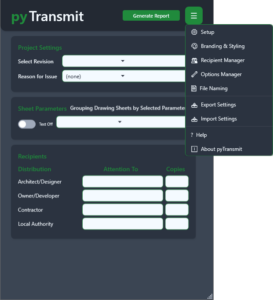
You open pyTransmit, and you get a clean panel right there in Revit. Pick your revision, set your reason, method, format, and print size, choose how to group the sheet list by whatever makes sense for the project, fill in who’s getting it, and that’s pretty much it. One window, one click, done.
The output is a properly formatted Excel workbook, full project header with your company logo, distribution table, and revision legend, clean pagination throughout, and print settings already configured. If the file happens to be open in Excel already, no problem, it’ll let you know. There’s a tab for the current issue and one for the full history, so you’ve always got a clear record of what went out and to whom.
Rather keep it inside the model? pyTransmit can push the transmittal straight into a Revit drafting view, ready to drop onto a sheet or title block whenever you need it. It’ll also export a live revision schedule and a formatted revision legend, pulling directly from your project data. All without leaving Revit.
Works the way your office works
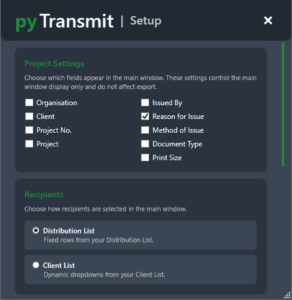
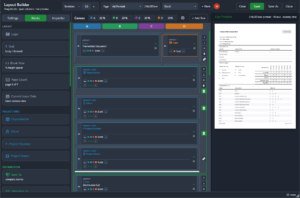
No two AEC firms run things the same way, and pyTransmit doesn’t try to force you into a box. You control which fields show up, manage your distribution and client lists, and configure your own dropdown options for reason, method, and format. Point it to a shared network location, and every user on the team automatically pulls from the same settings. Set it up once, and any updates you make are picked up by everyone the next time they open the tool. No manual syncing, no chasing people to copy files across, it just handles it.
It’s going places
The tool is already wired into Revit’s live project data, and the groundwork is there for a fully integrated issuing workflow built right inside Revit. What’s here now is genuinely useful on its own, but this is still just the beginning.
Free, open source, no catch
Transmittals are just part of the job. They always have been. They’re not a premium feature, and they shouldn’t come with a price tag attached. pyTransmit exists because that situation was overdue for fixing.
Take it, use it, make it your own. You’ve paid enough already.
Update now!!!!!!!